Showing posts with label nokia. Show all posts

Sep 13, 2015

nokia x hard reset

Lumia Hang Problem Solution You Should Backup Your All Data first before reset Your Mobile. 

Warning : Your All Personal Data Will be lost. Don't Forget Backup Your inporten Data

1. Turn Off Your Phone First

2. Push Together Volume Up + Power Key 

3. Release Only Power Key When Show Nokia Logo On Screen. keep pressing Volume Up key.
Lumia Hang Problem Solution You Should Backup Your All Data first before reset Your Mobile.   Warning : Your All Personal Data Will be lost. Don't Forget Backup Your inporten Data  1. Turn Off Your Phone First  2. Push Together Volume Up + Power Key   3. Release Only Power Key When Show Nokia Logo On Screen. keep pressing Volume Up key.   4. use Volume Down Key To Select wipe data/factory reset Press Power Key  5. than select yes -- Delete all Data  Use power Key To Confirm   6. After Finish That Select Reboot System Now   wait few second your android smart phone will be restart.


4. use Volume Down Key To Select wipe data/factory reset Press Power Key

Lumia Hang Problem Solution You Should Backup Your All Data first before reset Your Mobile.   Warning : Your All Personal Data Will be lost. Don't Forget Backup Your inporten Data  1. Turn Off Your Phone First  2. Push Together Volume Up + Power Key   3. Release Only Power Key When Show Nokia Logo On Screen. keep pressing Volume Up key.   4. use Volume Down Key To Select wipe data/factory reset Press Power Key  5. than select yes -- Delete all Data  Use power Key To Confirm   6. After Finish That Select Reboot System Now   wait few second your android smart phone will be restart.


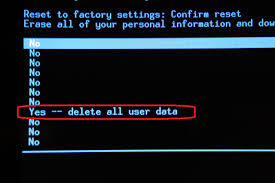
5. than select yes -- Delete all Data  Use power Key To Confirm 

Lumia Hang Problem Solution You Should Backup Your All Data first before reset Your Mobile.   Warning : Your All Personal Data Will be lost. Don't Forget Backup Your inporten Data  1. Turn Off Your Phone First  2. Push Together Volume Up + Power Key   3. Release Only Power Key When Show Nokia Logo On Screen. keep pressing Volume Up key.   4. use Volume Down Key To Select wipe data/factory reset Press Power Key  5. than select yes -- Delete all Data  Use power Key To Confirm   6. After Finish That Select Reboot System Now   wait few second your android smart phone will be restart.

6. After Finish That Select Reboot System Now 

Lumia Hang Problem Solution You Should Backup Your All Data first before reset Your Mobile.   Warning : Your All Personal Data Will be lost. Don't Forget Backup Your inporten Data  1. Turn Off Your Phone First  2. Push Together Volume Up + Power Key   3. Release Only Power Key When Show Nokia Logo On Screen. keep pressing Volume Up key.   4. use Volume Down Key To Select wipe data/factory reset Press Power Key  5. than select yes -- Delete all Data  Use power Key To Confirm   6. After Finish That Select Reboot System Now   wait few second your android smart phone will be restart.

wait few second your android smart phone will be restart. 

Sep 9, 2015

nokia lumia 1020 hard reset

Reset Your Nokia Lumia 1020 Phone.
At First Backup Your All Contact Number And Others Information and Remove Memory Card And Sim Card.
Battery Charge need 70% Up 
Method 1 :
1.First Turn OFF Your Device.
2. Press and hold volume down + Camera + Power Key To Turn On Your Device. when Device will Vibrate Release only Power Key.


Reset Your Nokia Lumia 1020 Phone.  At First Backup Your All Contact Number And Others Information and Remove Memory Card And Sim Card.  Battery Charge need 70% Up   Method 1 :  1.First Turn OFF Your Device.  2. Press and hold volume down + Camera + Power Key To Turn On Your Device. when Device will Vibrate Release only Power Key.


2. Wait Few Second System will be auto restart.

Method 2 :
1 . Turn On Your Device First 
2. than Go To Start Menu 
3. Select Settings 
4. Scroll Down to Select About 
5. Now Select Reset Your Phone.
6. tap yes....
7. tap yes
wait few second system will be auto reboot. 


nokia 225 hard reset

1st method :

1. Press Power Key To Turn On Your Device

2.  Now Press and Hold * key + 3 key + Call button + Power button.
1st method :  1. Press Power Key To Turn On Your Device  2.  Now Press and Hold * key + 3 key + Call button + Power button.                     3. when show logo on screen release all keys.  than enter your security code.   Nokia mobile default security code is 12345.   2nd method :  First Backup Your All Data and make sure your mobile battery is not empty   Type This Code use keypad *#7370# or *#7780#  Now Press call button to confirm hard request.  3rd method :   Turn On Your Device First Press Menu Settings -> Phone -> Phone management -> Factory Settings -> Delete data and restore.  now press "yes" to confirm hard reset.  after few second hard reset finish   done.


3. when show logo on screen release all keys.

than enter your security code. 

Nokia mobile default security code is 12345.


2nd method :

First Backup Your All Data and make sure your mobile battery is not empty

 Type This Code use keypad *#7370# or *#7780#

Now Press call button to confirm hard request.

3rd method : 

Turn On Your Device First Press Menu Settings -> Phone -> Phone management -> Factory Settings -> Delete data and restore.

now press "yes" to confirm hard reset.

after few second hard reset finish 

done.

Sep 7, 2015

How To hard reset nokia e5

method one:
At First Make Sure Your Mobile Battery Is not Empty 
method one: At First Make Sure Your Mobile Battery Is not Empty      1. Turn Off Your Nokia e5 Mobile Phone  2. press and hold * + 3 + Call button than press power key together until show logo.  wait few second.   method two:  1. Type This Code on your mobile *#7370#  After that Mobile Ask you Security code type your code and press ok. Nokia Default Code is 12345  Done.

1. Turn Off Your Nokia e5 Mobile Phone
2. press and hold * + 3 + Call button than press power key together until show logo.
wait few second. 
method two:
1. Type This Code on your mobile *#7370#
After that Mobile Ask you Security code type your code and press ok.
Nokia Default Code is 12345
Done.

Sep 3, 2015

How To nokia xl hard reset Solution Step By Step easily

if your mobile app is not working. fatal error Problem. some option is not working auto restart etc. you need hard reset your nokia xl mobile phone. today i will share with you how to hard reset your smart phone nokia xl. step by step. before hard reset first backup your all data on sd card. also backup your contact number and images, videos and others information. after hard reset all data will be erase.

Warring : Backup Your All Data contact number, message, pictures, videos and others information.

Warring : For Hard Reset Battery Charge Need 60% OR 70%UP

Follow this method how to hard reset nokia xl

1.Turn OFF your Device First. if your phone is hang remove battery and insert.
2. Now Keep Pressing Together Volume Up Key + Volume Down Key + Power Key until Show The Recovery menu.
if your mobile app is not working. fatal error Problem. some option is not working auto restart etc. you need hard reset your nokia xl mobile phone. today i will share with you how to hard reset your smart phone nokia xl. step by step. before hard reset first backup your all data on sd card. also backup your contact number and images, videos and others information. after hard reset all data will be erase.    Warring : Backup Your All Data contact number, message, pictures, videos and others information.  Warring : For Hard Reset Battery Charge Need 60% OR 70%UP
3. use volume down key to scroll Select wipe data/factory reset and press Power Key To Confirm 

3. use volume down key to scroll Select wipe data/factory reset and press Power Key To Confirm
4.then Select Yes -- delete all user data press power key to confirm 

4.then Select Yes -- delete all user data press power key to confirm
5. Now Select reboot system now Press power key Device will be auto restart 

Sep 2, 2015

How To Nokia N8 hard reset

Hard Reset Your Nokia N8 Mobile Phone Clear All Contact Number, Message, Picture, Videos Before sell.

Recharge Your Mobile hone Battery First and Remove Sim Card And Memory Card, Backup Your All Data 


1. Press and Hold together Camera Button + Home Button and Volume Down button Now Press Power Button until Phone vibrate. 


Hard Reset Your Nokia N8 Mobile Phone Clear All Contact Number, Message, Picture, Videos Before sell.  Recharge Your Mobile hone Battery First and Remove Sim Card And Memory Card, Backup Your All Data


2. now only release Power button and still press camera button + Home button + Volume down button. 


Hard Reset Your Nokia N8 Mobile Phone Clear All Contact Number, Message, Picture, Videos Before sell.  Recharge Your Mobile hone Battery First and Remove Sim Card And Memory Card, Backup Your All Data

3. show nokia logo on screen release all buttons. 

Done.

Warring : Don't Forget Backup Your impotent data. after hard reset all data will be lost

fiverr notification problem solution

  Step 1: Change Battery to "Unrestricted" By default, Android optimizes apps to save battery, which kills their background connec...